CMMC 2.0 Final Rule is in effect.  Defense contractors handling CUI need to be assessment-ready.
CMMCDocs.com — CMMC compliance software CMMCDocs.com The CMMC Readiness Platform (727) 266-2362 Get Demo Account
CMMC 2.0 Level 2 · NIST SP 800-171 Rev 2

Know exactly what your C3PAO will find — before they walk in.

CMMCDocs maps every assessment objective against every asset and vendor in your environment. You see the gaps, the evidence, and the POA&M status in one grid — so nothing surprises you on assessment day. SSP, evidence vault, SPRS score, and eMASS export included.

Get assessment-ready in 60 days — not the 12–18 months a consultant will quote you.
  • Built around the official NIST SP 800-171 Rev 2 control set and the CMMC 2.0 Final Rule
  • Designed with input from CMMC Registered Practitioners and former DoD assessors
  • Trusted by defense contractors across the DIB — from machine shops to engineering firms
CMMCDocs official seal
The Actual Product

This is what you'll be working in.

Real screen, real data — your live POA&M tracker with the 180-day countdown, control references, owner assignment, and aging built in. No mockups.
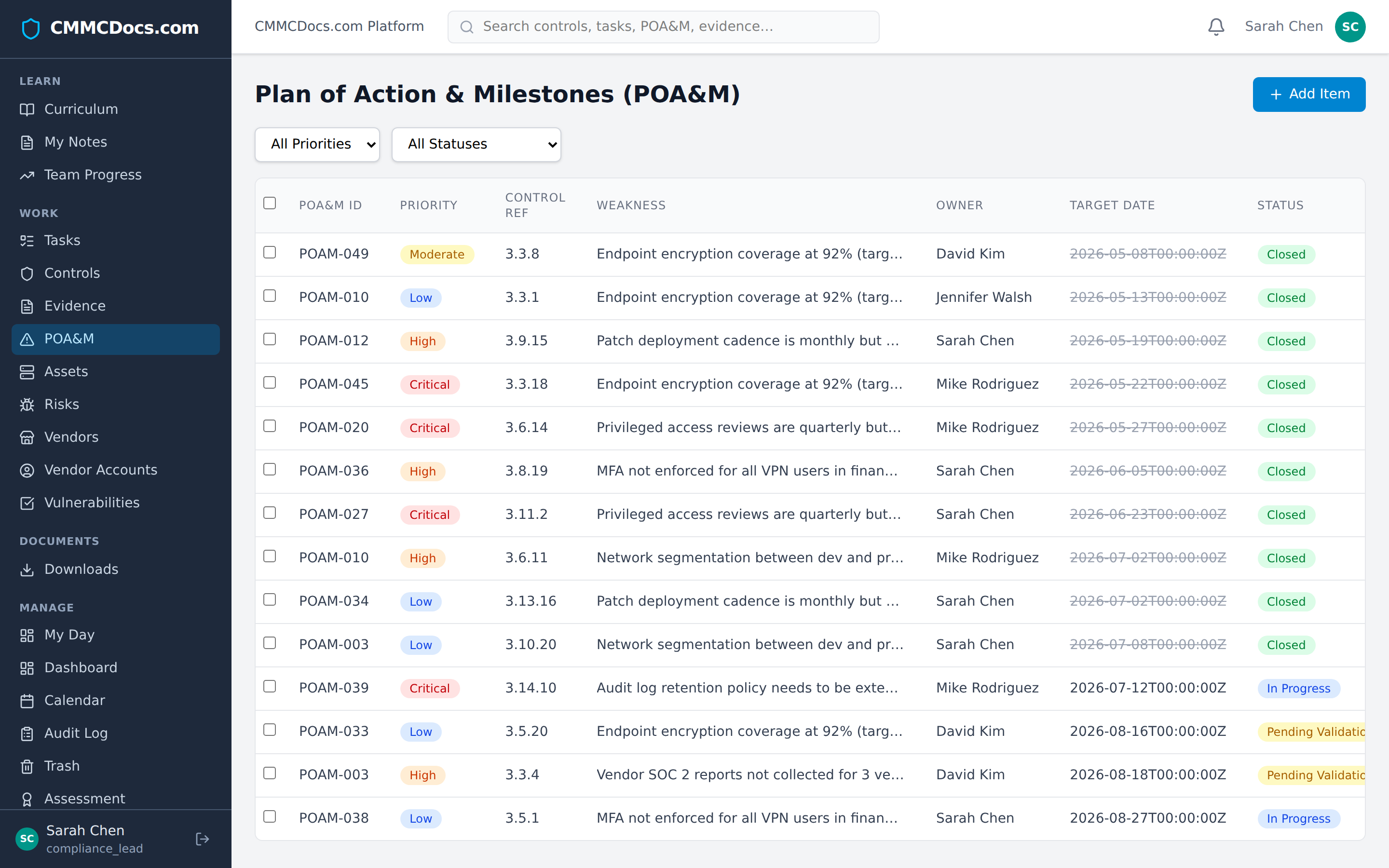
app.cmmcdocs.com / Plan of Action & Milestones
CMMCDocs POA&M tracker showing real CMMC data with priority, control reference, weakness, owner, target date, and status columns

Want to click around? Scroll down and request a demo — we'll email you a one-click read-only login to a fully populated workspace.

Regulatory Backdrop

Why this matters right now

The CMMC 2.0 Program Final Rule (32 CFR Part 170) took effect December 16, 2024, and the acquisition-side rule amending DFARS 252.204-7021 phases certification requirements into DoD contracts beginning in 2025. Any contractor or subcontractor processing, storing, or transmitting Controlled Unclassified Information (CUI) under DFARS 252.204-7012 will need a CMMC 2.0 Level 2 certification — assessed by an authorized C3PAO for prioritized acquisitions — at the point of contract award. A failed assessment means no award, no renewal, and potential False Claims Act exposure for prior SPRS score affirmations made by a senior official. The cost of a re-assessment is six figures. The cost of losing a single DoD prime or sub contract is typically far more.
If This Sounds Familiar

The pain you're living with — and what we do about it

You've inherited a compliance program built out of Word docs, SharePoint folders, and someone's email. Here's what changes when you replace it with one system of record.

The pain you're living with What CMMCDocs does about it
Your SSP is a 500-page Word doc nobody has updated since 2023.Live SSP broken into per-control sections, auto-saves, flags placeholder text, and exports to a clean .docx the assessor can read.
Your POA&M exists, but you can't tell which items are past the 180-day window.POA&M tracker with hard 180-day countdown timers, owner assignment, and red/yellow/green aging — visible on the dashboard, not buried in a tab.
Every requirement has evidence "somewhere" in your shop — screenshots in email, configs on a laptop, logs in Slack.Per-requirement evidence vault. Drag-drop screenshots, configs, and logs directly under the requirement they prove. One click builds the assessor packet.
Your policy templates came from a consultant. They're generic and half of them don't match what your team actually does.Pre-built policy and procedure set written for small DIB shops, with inline editing and a "this is how we actually do it" field on every requirement.
Your annual security awareness training is a fire drill every December.Built-in CUI and insider-threat curriculum, per-user completion tracking, automatic reminders, and exportable training records for the assessor.
Your MSP handles half the requirements, your team handles the other half, and nobody knows which is which.Shared/inherited flag on every requirement with a named responsible party (you, MSP, or cloud provider) and a responsibility matrix tied to each assessment objective — the granularity an assessor will actually accept.
Your CEO asks you every Monday "are we ready" and you don't have a real answer.Single readiness percentage on the home screen, broken down by control family, with a date-of-last-evidence stamp on every item.
Your last assessor visit, your team spent three days hunting for documents you knew you had.Auditor mode: a read-only, organized export of the SSP, POA&M, evidence packet, and training records — generated in under a minute.
The Platform

Know exactly where you stand — before your assessor does

CMMCDocs doesn't just store documents. It tracks every asset, every vendor, every control objective, and every piece of evidence — then tells you exactly what's missing. When the C3PAO walks in, you already know the answer to every question they'll ask.

Asset & Vendor Coverage Grid

See every gap across every asset, for every objective

The assessor doesn't just check if you have a policy — they check if it's applied to every in-scope system. CMMCDocs maps each of the 273 assessment objectives against every hardware asset, software application, and vendor. One glance tells you: this laptop has evidence for objectives A and B, but C is a gap. No other platform does this.

5-Minute Inventory Setup

Hardware wizard, software wizard, vendor wizard

Enter "25 laptops, 3 servers, 2 printers" and the system creates all 30 assets with sequential codes, default owners, and in-scope status. Do the same for vendors — check Microsoft, AWS, CrowdStrike from a list, add your MSP. Fill in serial numbers and details later. Get the inventory count right first, because every control needs evidence for every asset.

Evidence That Doesn't Go Stale

Freshness tracking with 90-day color coding

Every piece of evidence shows its age: green under 30 days, amber at 60, red past 90. Every file is SHA-256 hashed at upload and retained for six years from your CMMC certification date. One click exports the full artifact list with hashes in the format eMASS requires. When the assessor asks "is this current?" — the color answers before you do.

Gap → POA&M in One Click

Turn every finding into a tracked remediation

Click a gap cell in the coverage grid and a POA&M creation form opens right there — pre-filled with the control, objective, and asset. 180-day deadline set automatically. Green means tracked, amber means you need to act. The assessor sees that every gap has a plan, every plan has a deadline, and none of them are expired.

SPRS Score — Live, Not Guessed

DoD Assessment Methodology, automated

Your SPRS score updates in real time as you close gaps and complete controls. Weighted per the DoD methodology — 1, 3, or 5 points per requirement. The readiness page shows exactly what's blocking certification: which controls are Gap, which POA&Ms are overdue, which evidence is missing. Fix the highest-weight items first.

SSP & Assessment Package

The deliverable you hand your C3PAO

Your System Security Plan builds itself as you work — scoping, boundary, control narratives, asset inventory, shared responsibility matrix. When assessment day comes, generate the complete package: SSP, network diagrams, evidence index keyed to 171A objectives, POA&M status, and SPRS score. One zip file. Everything the assessor needs.

Role-Based Training

Your IT Lead speaks 800-171 on assessment day

80 lessons across 8 modules, assigned by role. Your IT Lead gets AC, AU, CM, SI. Your HR lead gets AT, PS. Each lesson ends with a quiz — configurable pass threshold, fail-and-retry cycle, full analytics. When the C3PAO interviews your control owners, they answer in the vocabulary of NIST SP 800-171 — not improvised.

Platform Security You Can Point To

Your compliance tool shouldn't be a compliance risk

MFA with TOTP enrollment. 15-minute idle session timeout. Account lockout after 5 failures. Password complexity and 90-day rotation with reuse prevention. SHA-256 audit hash chain for tamper evidence. HSTS, CSP, and security headers. SIEM webhook for audit events. When the assessor asks about your compliance platform's security — you hand them the list.

Audit Trail & Assessor Mode

Read-only share link with one click

Every change is logged: who, what, when, from where. Every user action has a human-readable summary, not a raw database entry. Generate a read-only share link for your C3PAO and they see the evidence vault, control status, and POA&M items in a locked-down view — no accidental edits, no confusion about what's current.

Workflow That Forces the Right Order

Inventory first, then evidence, then certification

CMMCDocs won't let you upload evidence until your asset and vendor inventories are finalized. That prevents the #1 mistake: spending weeks building evidence, then adding 10 more laptops and having to redo everything. Core team first, inventory second, evidence third. The sidebar literally crosses out the work sections until you've completed the prerequisites.

POA&M Tracking

180-day closure rule, enforced

Every POA&M item ages visually against the 180-day window. Overdue items go red. Items without remediation plans get flagged. The system distinguishes between "OK Gap" (tracked with a fresh POA&M) and "X Gap" (untracked or stale). Your assessor sees that you're not just aware of gaps — you're actively closing them on a timeline.

Your Team's Dashboard

Everyone sees their own lane

Each person sees their open tasks, their controls, their curriculum progress, and their POA&M items. Not the whole company's — just theirs. The compliance lead sees the rolled-up org view. The exec sponsor sees the SPRS score and the GO/NO-GO indicator. Email digests catch the people who don't log in daily. Nothing decays silently.

Built For Your Whole Team

Three people in your company need this.
We speak to all three.

For the CEO / Owner

Don't lose the contract over a checkbox.

CMMC Level 2 is now a gate on every DoD award you bid. CMMCDocs gets you assessment-ready in weeks, not years, for less than the cost of one lost RFP. Get a single number and a deadline you can take to the board.

For the Compliance Lead / CISO

See every gap across every asset before the assessor does.

The coverage grid shows 273 objectives × every asset and vendor in one matrix. Green means covered, red means gap, amber means tracked with a POA&M. No spreadsheets, no guessing, no surprises. When the C3PAO asks "show me MFA on all your laptops" — you click one cell.

For the IT Lead

Add your assets in 5 minutes. Attach evidence per objective. Done.

The asset wizard builds your hardware and software inventory. The vendor wizard catalogs your supply chain. Then for each control, check the boxes, attach the evidence, and watch the status go green. The platform tells you what's missing — you don't have to figure it out.

$

The math is obvious.

Average lost DoD subcontract

$250K+

C3PAO re-assessment fee

$50K–150K

CMMCDocs Professional

$9,600/yr

One lost contract pays for 26 years of CMMCDocs. One re-assessment pays for 5–15 years. Pick the line item that lets you sleep.

Pressure Test

What an assessor expects on day one

Whether you're walking into a C3PAO certification assessment, a Joint Surveillance Voluntary Assessment (JSVA) conducted under DIBCAC oversight, or your three-year recertification — the assessment week looks the same. If your reaction to any of these is "I don't have that ready," you're not alone — but you don't have to stay there.

  1. Open with a scoping validation session — defend your CUI boundary, every Security Protection Asset (SPA), every Contractor Risk Managed Asset (CRMA), and every Out-of-Scope asset, with diagrams.
  2. Interview the AC family owner about account provisioning, periodic access reviews, and separation of duties — and watch a real review happen in your IdP.
  3. Demonstrate MFA enforcement for remote access and privileged accounts per AC.L2-3.1.13 and IA.L2-3.5.3 — live, in your environment, not in a screenshot.
  4. Produce the evidence list for AU.L2-3.3.1 audit events: which events are logged, on which Information Systems, retained how long, reviewed by whom, on what cadence.
  5. Walk through your Incident Response plan, last tabletop artifacts, and the 72-hour reporting workflow into DIBNet required by DFARS 252.204-7012.
  6. Pull a sample of media sanitization records under MP.L2-3.8.3 — and show the NIST SP 800-88 method used.
  7. Inspect your configuration baselines (CM family), the change control record for the last 90 days, and evidence that unauthorized software is actually being blocked.
  8. Validate FIPS-validated cryptography (SC.L2-3.13.11) by asking for CMVP certificate numbers for every module protecting CUI — not vendor marketing claims.
  9. Review your shared responsibility matrix with every external service provider touching CUI, including FedRAMP Moderate authorization evidence for any cloud handling CUI.
  10. Sample your training records (AT family), background screening records (PS family), and reconcile every open POA&M item against the 180-day clock before issuing the final assessment report.
Try It Without A Sales Call

See the actual product. Today.

Spin up a demo account in under a minute, pre-loaded with a sample SSP, POA&M, and evidence vault so you can click around the way an assessor would.

No credit card. No sales call. We'll email your demo login within minutes.

Instant accessDemo account with sample SSP, POA&M, evidence, and curriculum data.
30-min walkthroughOne-on-one tour from the founder, on request.
Direct linePersonal Slack and email access for your first week.
Frequently Asked

Questions defense contractors keep asking us

Do I need CMMC Level 2 certification?
If your company handles Controlled Unclassified Information (CUI) under a DoD contract or subcontract, you almost certainly need CMMC Level 2. The CMMC 2.0 Final Rule phases certification requirements into DoD contracts, and prime contractors are already flowing the requirement down to subs. If your contract references DFARS 252.204-7012 and you receive CUI, plan for a third-party Level 2 assessment by a C3PAO.
What is the difference between CMMC Level 1 and Level 2?
Level 1 covers 17 basic safeguarding practices for Federal Contract Information (FCI) and allows annual self-assessment. Level 2 covers all 110 security requirements in NIST SP 800-171 Rev 2 and applies to contractors handling CUI. Most Level 2 contracts require a third-party assessment by a C3PAO every three years, with annual affirmation by a senior company official in SPRS.
How long does CMMC certification take?
For most small and mid-size defense contractors, CMMC Level 2 readiness takes six to eighteen months depending on starting maturity. Companies with an existing IT program and documented policies move faster. CMMCDocs shortens that timeline by giving you a structured curriculum, a pre-built SSP framework, and an evidence vault so you stop rebuilding documentation from scratch.
How much does CMMC Level 2 certification cost?
Total cost varies widely. C3PAO assessment fees alone typically range from the low five figures to well into six figures based on scope and complexity. Add internal labor, remediation, tooling, and consultants, and many contractors spend significantly more. A compliance platform like CMMCDocs reduces consultant dependency and remediation time, which is usually where budgets overrun.
What is a POA&M and how does it work under CMMC?
A Plan of Action and Milestones (POA&M) documents requirements you have not yet fully implemented and your plan to close them. Under CMMC 2.0, a limited subset of requirements can be on a POA&M at assessment time, and you have 180 days to close them or you lose conditional status. CMMCDocs tracks every POA&M item against that 180-day window automatically.
What is an SSP and do I need one for CMMC?
A System Security Plan (SSP) is the foundational document describing how your organization meets each NIST SP 800-171 Rev 2 security requirement. It is required for CMMC Level 2 and is the first artifact a C3PAO will ask for. Your SSP must be current, accurate, and tied to real evidence. CMMCDocs builds your SSP as a living document that updates as your environment changes.
We already have a SharePoint full of this stuff. Why do we need this?
Most of our customers did too. The problem isn't that the documents don't exist — it's that nobody knows which version is current, which requirements each one maps to, or what's missing. CMMCDocs is built around the 110 requirements themselves, so every policy, procedure, and piece of evidence lives under the requirement it satisfies. Pull your existing SharePoint content in on day one. We just give it a structure an assessor will recognize.
Our MSP says they'll handle CMMC for us. Doesn't that cover it?
Some MSPs are great at this. Most handle the technical controls — MFA, logging, patching — and leave the documentation, training, POA&M, and assessor prep to you. CMMC is roughly 60% paperwork and process, and your MSP cannot sign your SSP. CMMCDocs is designed to work alongside your MSP: mark requirements as inherited, attach their evidence, and keep the things only you can own — policies, training records, incident response — in one place.
How is this different from a GRC tool like Drata or Vanta?
Those tools are built for SOC 2 and ISO shops with cloud-native stacks and a full-time compliance team. CMMC is a different animal — it's NIST 800-171, it covers physical and personnel requirements, and it's assessed by a human being from a C3PAO, not an automated scan. CMMCDocs is built for one framework, for small defense contractors, and ships with the actual SSP, policies, and curriculum you need. No 90-day implementation. No per-integration pricing.
Is our CUI safe in your platform?
CMMCDocs is your compliance system of record, not a CUI enclave. It holds the artifacts that describe your program — policies, procedures, evidence screenshots, training records, POA&M items, audit logs — and that's exactly the boundary you want. CUI itself stays in your existing CUI environment (your GCC High tenant, your on-prem enclave, wherever you've already drawn the line) where it's already inside scope. We run in a US-only environment with FIPS-validated encryption at rest and in transit, append-only audit logging, row-level tenant isolation, and SHA-256 integrity hashing on every uploaded file. The platform itself is built and operated to NIST SP 800-171 Rev 2 standards — we run our own program in our own product, and we're happy to walk you through our SSP on request. If you're unsure whether a specific artifact crosses the CUI line, ask us before you upload — we'd rather tell you "send that one to your enclave instead" than guess.
What happens if we cancel?
You leave with everything. One click exports your SSP and policies as .docx, your POA&M and evidence index as .xlsx, and your raw evidence files as a single zip. No "request your data within 30 days" games. We'd rather you stay because the product earns it every month than because you're afraid of what happens if you go.
Built By Someone Who's Done It

You're not buying from a salesperson.

Mike, founder of CMMCDocs.com

Hi, I'm Mike — and I built this because my clients needed it.

I've spent nearly 35 years building software and the last 20 running Devion, the company behind ComponentCRM.com, InventoryCapture.com, and a long list of other systems built for the electronic component industry. A lot of our customers are small defense subcontractors — and over the last few years, I've watched them suffer through CMMC.

They were drowning in 500-page Word documents, screenshots scattered across SharePoint, consultants who delivered binders no one could maintain, and GRC tools (Drata, Vanta, Apptega) that were built for SOC 2 shops with cloud-native stacks — not a 60-person machine shop trying to pass a C3PAO assessment, or a 20-person brokerage or component supplier trying to keep government contracts flowing. After enough late-night calls helping them assemble evidence at the last minute, I decided there had to be a better way — so we built it.

CMMCDocs is the platform I wish my customers had had three years ago. It's built by the same Devion team that's been shipping production software to the component industry for two decades. If you sign up for a demo, the email comes from me. If you ask for a walkthrough, I'm the one running it. I answer my own email and I'd rather lose the sale than sell you a tool you don't need.

— Mike, Founder, Devion · hello@cmmcdocs.com

Transparent Pricing

One annual price.
Unlimited users on every plan.

No per-seat math. No "contact sales for a quote." No surprise renewal hikes. Pick the tier that matches your headcount, get everything in the platform, leave any time.

Starter

For 1–25 employees
$4,800/yr
$400 per month, billed annually
  • Full CMMC Level 2 curriculum
  • Complete SSP & policy set
  • POA&M tracker & evidence vault
  • SPRS score calculator
  • Assessment package generator
  • Auditor share links (read-only mode for your C3PAO)
  • Unlimited users
  • Email & in-app support
  • Founder office hours
  • Quarterly readiness review
Get demo account

Enterprise

For 101–500 employees
$19,200/yr
$1,600 per month, billed annually
  • Everything in Professional
  • White-glove onboarding (8 hours)
  • SSO / SAML / SCIM
  • Priority support with SLA
  • Named customer success contact
  • Custom API access
  • Audit-log export to your SIEM
  • Unlimited users
  • Quarterly business review
  • Dedicated tenant infrastructure (optional)
Get demo account

500+ employees, multi-tenant parent orgs, or MSPs serving multiple OSCs?
Custom pricing scales with tenant count and SSO needs. Get in touch →

60-day money-back guarantee. If CMMCDocs doesn't help your team in the first 60 days, we refund every dollar — no questions, no exit interview, full data export included.

Your contract requires CMMC Level 2. We'll get you there.

Spin up a demo account, walk through the platform on your own time, and decide if it fits. No sales call, no credit card.

Get my demo account